
A real brand voice for every author.
AI Personas is PENMAN’s voice and expertise control layer. Define tone, style and “how it speaks” once, then apply it to content creation and EEAT campaigns — without letting personas make strategic decisions.
Render text in a consistent author-like style across articles and comments.
They don’t decide strategy; fact-checking stays with your editorial workflow.
Controlled execution: drafts first, diffs for review, rollback ready. Publishing is always explicit.
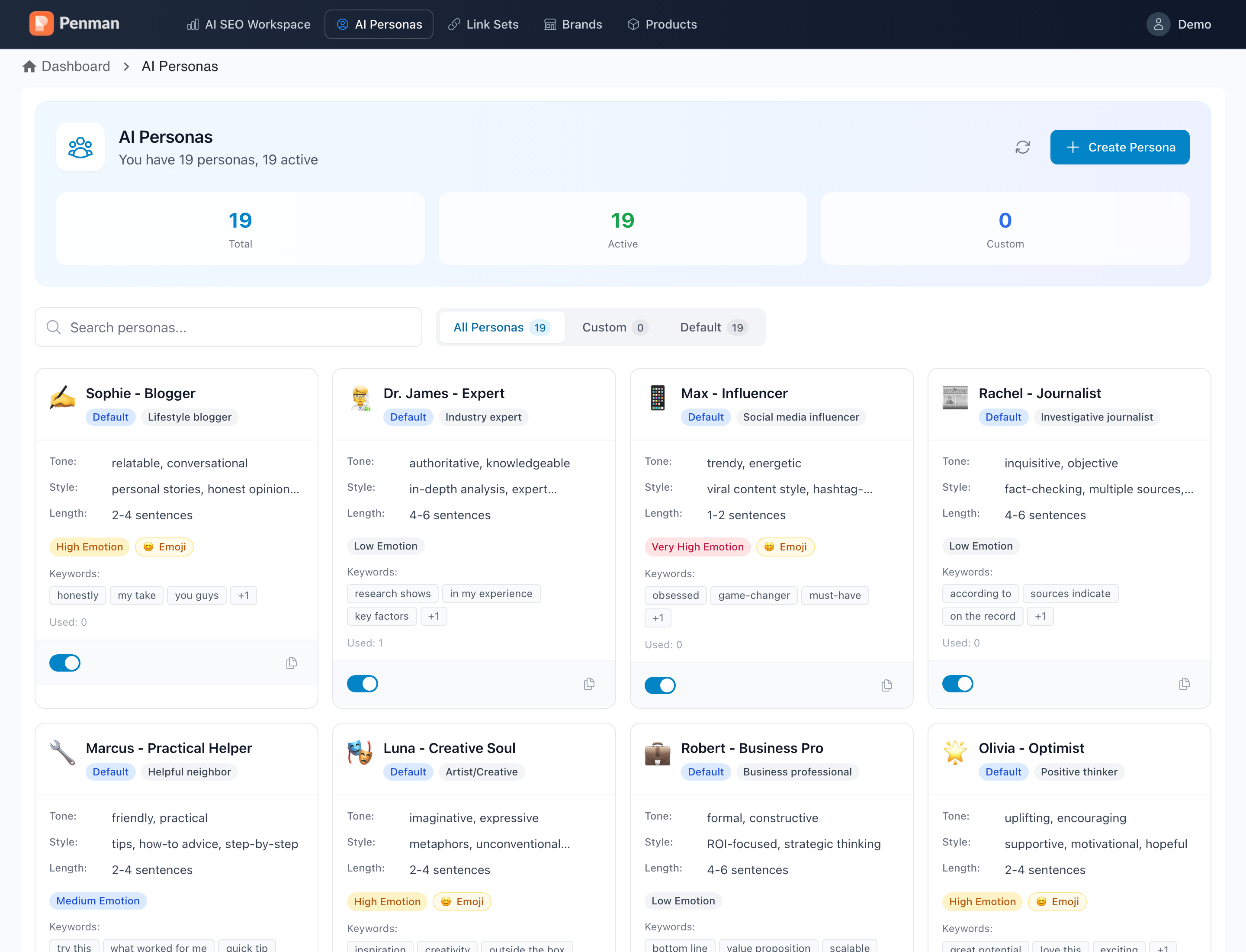
A voice layer you can actually operationalize.
Personas stabilize tone, technical level, argumentation style and output format — so the same workflow can ship RTM updates and evergreen pages.
Bios & expertise
Persona profiles map naturally to author boxes for E-E-A-T — bio, role, credentials and writing samples.
Tone presets
Pragmatic, journalistic, conversational — or your own custom rules. Reuse across articles, comments and outreach.
Per-task assignment
Pick a persona for each draft, comment or outreach message — the right voice for the right topic.
RTM-ready voice presets
Switch to a “reporter/analyst” voice for fast updates, then to “expert” for evergreen depth — without changing the workflow.
Format stabilization
Stabilize length, emotion level and keyword flavor so output stays predictable across runs and contributors.
Designed to connect
Personas are used by Content Creation and EEAT Campaigns — one voice layer, no duplicate rules per module.
How AI Personas works.
Personas are simple by design: they constrain voice. You decide where they apply (articles, comments, or both), and PENMAN renders text accordingly.
-
1
Create or edit a persona definition
Define tone, style and expertise expression. Add optional “flavor” controls like length, emotion level, emoji preference and keyword cues.
-
2
Select where it applies
Choose the target context: content creation (articles) or comment generation (EEAT campaigns) — or both.
-
3
Generate output in a consistent voice
PENMAN applies persona style constraints so generated text reads like the same author, even across multiple runs.
-
4
Review safely: drafts, diffs, rollback
Use draft-first publishing. Review changes in diffs, publish explicitly, revert via revision history if needed.
Define when to use which persona
Set a team rule: RTM updates vs evergreen guides vs community comments. Codify it once, reuse it everywhere.
Templates + Link Sets
HTML Templates (format contracts) and Link Sets (approved references).
Quick answers about how personas behave.
Do personas change facts in the text?
Personas control voice (tone, style, expertise expression). Your team remains responsible for facts and sources.
Can I use different personas per brand or client?
Yes — personas are user-defined voice profiles. Teams commonly map them to brands, clients, or content lines to keep output consistent.
How do teams keep consistency over time?
Create a short internal rule: “when to use which persona” (RTM, evergreen, community). Then apply draft-first review so output stays aligned.
Does a persona affect structure and formatting?
Personas can stabilize length and response format, but for strict formatting you’ll typically pair them with HTML Templates.
How do personas connect to templates and campaigns?
AI Personas are used by Content Creation and EEAT Campaigns as a shared voice layer. Templates constrain structure; personas constrain voice — together they keep output predictable and reviewable.
Pair personas with draft-first.
Your team approves changes before anything goes live. Diffs, revision history, rollback — built in.
Define personas once. Apply them everywhere.
Use AI Personas as a controlled voice layer for content creation and EEAT campaigns — then review in drafts with diffs and rollback before publishing.