
Keep generated drafts consistent with your site’s HTML.
Create reusable formatting instructions for headings, HTML structure, CSS classes and supported content elements. Analyse an existing WordPress post or define the rules yourself, then review the generated draft before publishing.
Create a template from an existing post, then review the inferred rules.
Define HTML instructions, heading styles and CSS classes yourself.
Keep generated content in WordPress drafts and review revisions before publication.
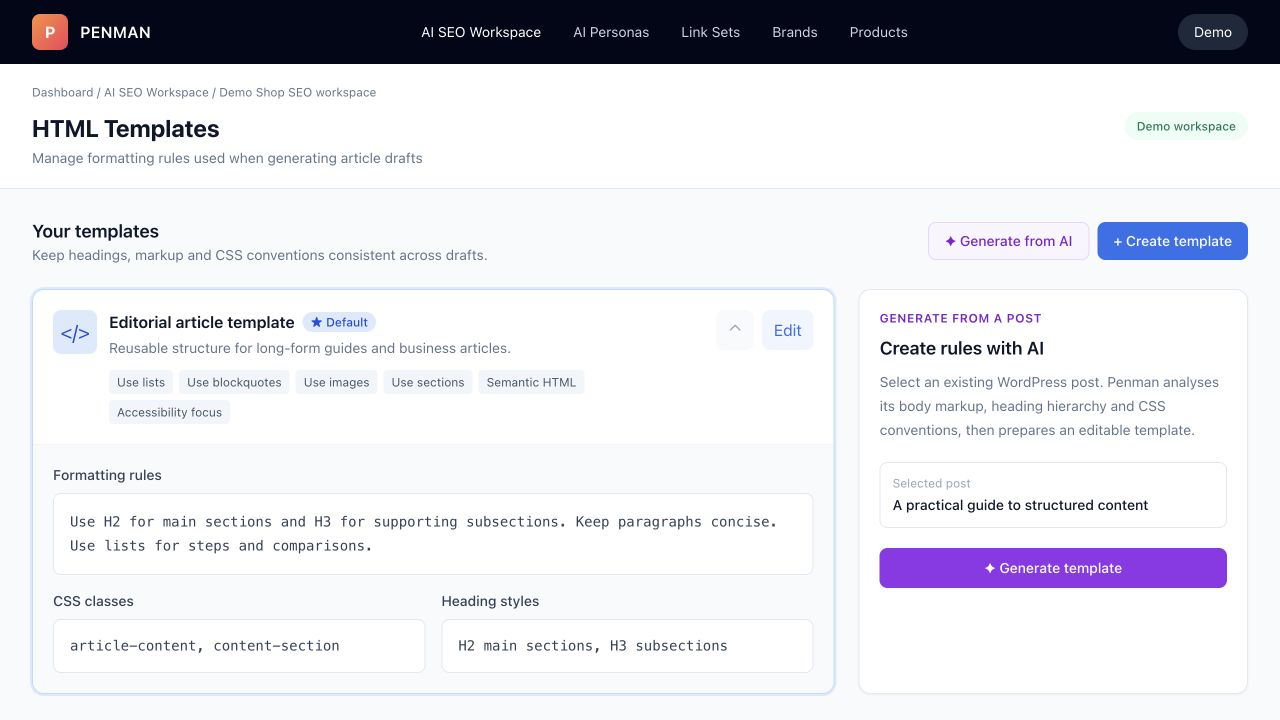
Templates help generated drafts follow selected headings, sections, content options and CSS conventions. Review the result before publishing.
Turn formatting rules into a repeatable drafting workflow.
Templates guide generated drafts toward your existing markup conventions. They do not replace your theme or create structured data automatically; you remain in control of the rules and the final WordPress draft.
Reusable formatting rules
Store heading hierarchy, HTML instructions and content options once, then select the template when generating a draft.
Semantic HTML options
Choose supported elements such as lists, tables, blockquotes, code, images and sections to keep draft structure predictable.
Your CSS conventions
Provide class names and heading styles that match your site, then review the resulting draft before publication.
Generate from AI — or write your own rules.
Two creation modes: Generate from AI (PENMAN analyzes existing posts and infers structure), or Create template (you define rules yourself).
Generate from AI
Select an existing post. PENMAN analyzes the HTML structure and produces a reusable template so future articles fit your layout by default.
Create template (manual)
Define exactly which tags, heading hierarchy and CSS classes should be used — including strict or minimal markup.
Set as default
Mark one template as “default” so every generated draft uses the same formatting rules automatically.
Override per post
Use different templates for different content types (e.g., technical vs editorial) without breaking design consistency.
What you can define
Templates support both free-form rules and structured fields:
- Template name + description
- Formatting rules (tags, structure, classes, constraints)
- CSS classes (e.g.
article-content) - Heading styles (H2 main, H3 subsections, etc.)
- Formatting options (lists, tables, blockquotes, code, images, callouts, sections)
- Semantic HTML + accessibility focus
Enable Minimal Markup for clean output, or enforce more structure with sections/callouts when your design relies on components.
Review template-based drafts before publishing.
Templates are part of the same draft and revision workflow as other Penman content changes, so the generated HTML remains reviewable.
Create or generate a template
Build from AI (blog post analysis) or define your own formatting rules and classes.
Generate content with the template
Content Creator produces a draft already wrapped in your target markup (headings, lists, callouts, sections).
Save to WordPress as draft
PENMAN writes the updated HTML into WordPress as a draft version — never a blind overwrite.
Review diff + publish when ready
See exactly what changed (HTML + content) inside revision history. Publish only after approval.
A different layout per content type.
Corporate posts, technical tutorials, comparison pages, evergreen guides — each can have a different layout, yet all remain consistent because the template governs structure and HTML output.
- Internal Linking: insert links without breaking design blocks
- AI Personas: rewrite sections preserving HTML schema
- SEO Workspace: analyze headings/links/images after generation
Add your own rules for tag usage, required sections, allowed classes and heading hierarchy. Templates are the contract between AI output and your site design.
Make your blog’s HTML structure the default for AI.
Auto-generate templates from existing posts, add your rules and publish safely with drafts + diffs.